
 ( 01 / 01 )
YealinkMVC S90 · 1106799
Yealink MVC S90Native MicrosoftTeams
R 137 860
Limited availabilityQuantity
1
R 137 860
12 monthly paymentsfrom R 11 488 / month
Illustrative estimate. Final payment terms are confirmed at checkout.Delivered byThursday, 17 September
Estimated from today, excluding weekends.Yealink MVC S90 Native Microsoft Teams Rooms System for Boardrooms
The Yealink MVC S90 is a premium Native Microsoft Teams Rooms system designed for large conference spaces and executive boardrooms. It delivers seamless, professional-grade Teams meetings with powerful computing, intelligent video, and flexible connectivity for a consistent and intuitive user experience.
Key Features
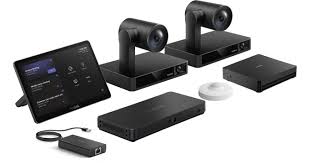
- 2x UVC86 4K dual-eye intelligent tracking PTZ cameras for crystal-clear video and advanced speaker tracking
- McoreKit-C5U with Mcore4 mini-PC preloaded with Microsoft Teams Rooms application for native one-touch meeting control
- Mtouch Plus touch panel for easy meeting management, content sharing, and camera adjustments
- Roomsensor enhances room intelligence with occupancy awareness
- AVHUB enables multi-camera and multi-screen flexibility for advanced AV layouts
- MVC-BYOD-EXT supports BYOD mode, allowing laptops to use installed cameras and displays for non-Teams platforms
- No audio devices included, ideal for integration with existing certified audio systems or custom audio setups
What’s in the Box
- 2x Yealink UVC86 4K dual-eye PTZ cameras
- McoreKit-C5U (Mcore4 mini-PC, Mtouch Plus touch panel, Roomsensor)
- AVHUB for multi-camera and multi-screen support
- MVC-BYOD-EXT for BYOD functionality
Ideal Use Cases
Perfect for executive boardrooms, large conference rooms, strategy spaces, and customer briefing centres requiring premium video quality, native Microsoft Teams Rooms compatibility, and advanced room integration. The scalable components and native Teams certification ensure consistent, high-impact collaboration across critical meeting spaces.
( Specifications )
| Audio Devices Included | No audio devices included |
| Audio Requirement | External microphones and speakers required (not included) |
| AV Hub | AVHub |
| AVHub Function | Central hub for multiple cameras and displays |
| AVHub Use Case | Large rooms with complex AV layouts |
| AVHub Video Inputs | Multiple USB and HDMI inputs (depending on configuration) |
| AVHub Video Outputs | Multiple HDMI outputs for displays |
| Brand | Yealink |
| BYOD Connectivity | USB / HDMI passthrough from user laptop |
| BYOD Extender | MVC-BYOD-EXT |
| BYOD Mode Support | Allows using room cameras and displays with user’s PC |
| Conference Platform | Certified for Microsoft Teams Rooms |
| Content Sharing | Wired content sharing supported |
| Country/Region Use | English-language markets |